

eBay Sold Listings: How to Find Real Resale Prices Before You Buy
How to use eBay sold listings to price any flip: find true comps, read sell-through rate, avoid the traps that inflate prices, and set a max buy price.
Sam Salfi5 min read
Every flipper has bought something because the active listings looked expensive. Then the item sat for six weeks, because nobody was paying those prices.
Asking prices are wishes. Sold prices are facts. That’s why eBay sold listings are the most useful free research tool a reseller has, and why they work for items you plan to sell anywhere, not just on eBay.
This guide shows how to find sold listings, how to read them without getting fooled, and how to turn them into a max buy price you can use on the spot.
How to See Sold Listings on eBay
You don’t need a seller account or a paid tool. Here’s the quick way:
- Search for the item on eBay.
- Open the filters (left sidebar on desktop, “Filter” on mobile).
- Scroll to Show only and tick Sold items.
- Sort by Ending recently to see the newest sales first.
Keep in mind that when a seller accepts a Best Offer, the price shown may not be what the buyer actually paid.
The standard sold filter covers roughly the last 90 days. That’s plenty for most flips, but it’s thin for slow-moving items like antiques or niche collectibles.
Want more history? Use Terapeak
eBay’s Seller Hub includes a Research tab (the tool formerly known as Terapeak). It shows sold comps, average sold price, and sell-through rate, with a longer look-back window than the basic filter. If you have a seller account, it’s worth five minutes to explore. If you’re only buying and flipping occasionally, the sold filter alone does the job.
Search Like a Pro: Get Clean Comps
A sloppy search gives you a sloppy number. Before you trust a price, tighten the search.
- Use the exact model. “Nikon camera” blends $30 point-and-shoots with $900 bodies. “Nikon D5600 body only” doesn’t.
- Match condition. Compare used with used, and “for parts” with “for parts.” Mixing them drags your average in the wrong direction.
- Exclude noise. Add a minus sign to drop words, such as
-lot -bundle -parts. - Match the variant. Color, storage size, edition, and region can swing a price by 20% or more.
- Check completeness. Box, charger, remote, and accessories matter. A complete-in-box item often sells for noticeably more.
Aim for 8 to 15 comparable sales. Fewer than five and you’re guessing.
Quick tip: Don’t use the average. Look at the range, then use the median, the middle price. One lucky $400 sale on a $150 item shouldn’t set your plan.
Read the Numbers: Sold Price vs. Sell-Through Rate
A good sold price means little if the item takes three months to move. You want two numbers.
1. Typical sold price
Throw out the top and bottom outliers and note the middle range. That’s what you can realistically expect.
2. Sell-through rate
Sell-through rate tells you how fast an item moves compared with how many are competing. A common reseller formula:
Sell-through rate = items sold (last 90 days) ÷ active listings
For example, 60 sold over 90 days with 120 listings active is a 50% rate. Retailers calculate it differently, so compare like with like.
Context matters more than the percentage itself. Ten sales at $85 out of twelve listings is a healthy market. Ten sales at $85 out of two hundred listings means most sellers are stuck with unsold stock, and you’d be joining the pile.
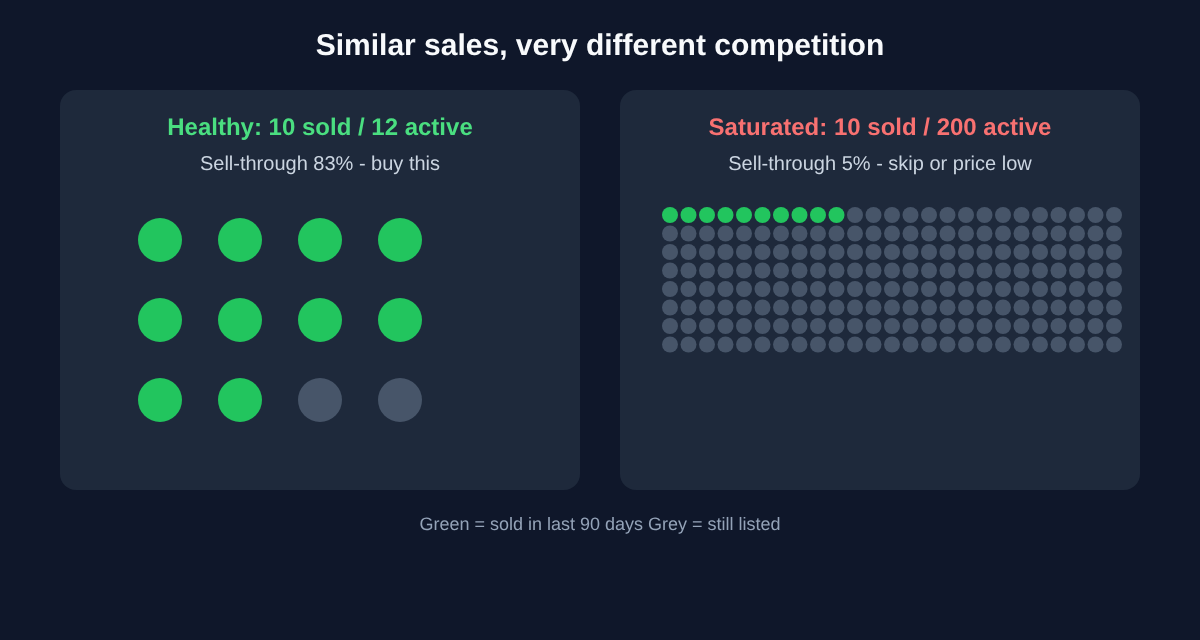
A rough guide (not an official eBay benchmark, so adjust for your category):
- Above 50%: Strong demand. Buy with confidence.
- 20-50%: Decent. Price competitively and expect a few weeks.
- Below 20%: Crowded or slow. Only buy at a steep discount.
Spot the Traps That Distort Sold Prices
Sold data is the best evidence you have, but it isn’t perfect. Watch for these:
- Bundles and lots. A “lot of 5” sold price makes the single item look more valuable than it is.
- Best Offer sales. The listed price may be higher than what the buyer paid.
- Shill or unusual bids. One very high or very low outlier usually isn’t repeatable.
- Seasonality. Winter coats sell for more in October than in July. Check whether your 90-day window matches the season you’ll sell in.
- Returns and cancellations. A sold price doesn’t always mean the sale completed.
- Different markets. A price in the UK or Canada may not apply to your buyers. Filter by location when it matters.
If a number looks too good, find three more sales that agree before you act on it.
Turn Sold Comps Into a Max Buy Price
Here’s the step most guides skip. Research only pays off if it produces a number you can use in the moment, while you’re standing in a thrift store or reading a Facebook Marketplace listing.
Use this formula:
Max buy price = expected sold price − fees − shipping − your target profit
Say a handheld game console typically sells for $120.
- eBay fees (roughly 13-15% of the total in many categories): about $17
- Shipping, if you pay it: $9
- Target profit: $30
Max buy price: $120 − $17 − $9 − $30 = $64
Save that number. If a seller asks $60, you’re in. If they want $85, you walk away or negotiate. Our guide on how to calculate profit margins goes deeper on fees and hidden costs, and how to price items for resale covers setting your own listing price.
Make it a routine
Do this once per category and you’ll build a mental price list quickly. Keep a simple note or spreadsheet with:
- Item and model
- Median sold price
- Sell-through rate
- Your max buy price
- Date checked (prices drift)
After a few weeks, you’ll price most items from memory and only need to check the strange ones.
Put Sold Data to Work: Find Underpriced Listings Faster
Once you know what things really sell for, the next bottleneck is finding listings priced below that number before another flipper does. Underpriced items on Facebook Marketplace, Craigslist, Vinted, and eBay itself are often gone within minutes.
That’s where instant alerts help. Set up a search for the exact items you’ve researched, filter by the max buy price you calculated, and get notified when something new appears. Flipify watches multiple marketplaces for you, so your sold-comp research turns into a short list of real deals instead of an afternoon of scrolling. Our guide to setting up alerts walks through it step by step.
Quick Recap
- Sold listings show what buyers paid. Asking prices don’t.
- Search narrowly: exact model, condition, and variant.
- Use the median, not the average, and gather at least 8-15 comps.
- Check sell-through rate so you don’t buy items that sit.
- Watch for traps: bundles, Best Offer sales, seasonality.
- Convert comps to a max buy price before you start shopping.
Spend ten minutes on research before you buy and you’ll save hours of relisting later. Pick one category you flip this week, pull 10 sold comps, and write down your max buy price. That one number will make your next purchase easier.
Written by Sam Salfi
Sam Salfi is the founder of Flipify, the marketplace alert app that helps resellers and flippers see new Facebook Marketplace, eBay, Craigslist, and OfferUp listings first.
Keep reading
Selling & Pricing
The Cheapest Way to Ship Packages as a Reseller (2026 Guide)
How to find the cheapest way to ship packages as a reseller: pick the right carrier by weight, avoid dimensional weight traps, and stop retail counter markups.
6 min read
Selling & Pricing
Reseller Taxes: What Flippers Actually Owe in 2026
A practical guide to reseller taxes: what counts as income, how the 1099-K threshold works in 2026, which expenses you can deduct, and how to stay organized.
6 min read
Selling & Pricing
How to Calculate Profit Margins for Your Flipping Business
Learn how to calculate profit margins to understand your real earnings. Our guide for flippers has formulas, real-world examples, and expert tips.
14 min read